Windows Live Writer Post Download Plugin
Come promesso, questo è il post sul plugin da premio Nobel che mi sono auto assegnato.
Il problema: tempo fa cercando sul mio blog, ho scoperto che un post antico non si visualizzava correttamente in quanto l’immagine hot-linkata su WikiPedia era stata rinominata. Siccome la piattaforma ancora non supporta l’editing on-line (Всему свое время, direbbero i russi), l’alternativa era quella di aprire gli ultimi 500 post via Windows Live Writer, trovare quello giusto, editarlo e ripubblicarlo. Più facile a dirsi che a farsi ed il post è rimasto “rotto” per un bel po’
La soluzione (teorica): la prima soluzione è stata quella di suggerire al team di Windows Live Writer di supportare l’apertura di un post tramite PostId. Purtroppo il suggerimento non è stato recepito in tempo (vorrei sperare) ed io ed un paio di colleghi siamo rimasti con un palmo di naso.
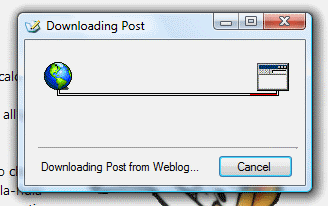
La soluzione (pratica): armato di santa pazienza e di magico reflector, ho ravanato un bel po’ nel codice di Windows Live Writer ed ho scoperto che la magica funzionalità era a qualche API di distanza. Da lì è stato poi semplice: ho referenziato le giuste DLL, creato le 10 righe di codice necessarie per fare la magia e ho creato uno URI protocol handler (wlw://) per invocare il codicillo magico. Il tutto condito di un installer ed una UI frichigna, che poi in realtà altro non è che una semplice animazione visto che scaricare il post via webservice non è una delle operazioni più veloci del mondo ed ho dovuto renderla asincrona. Tutto qui? Non proprio. Nel momento in cui ho testato il plugin sul mio PC in ufficio per testare che tutto funzionasse su un PC “vergine”, ho scoperto che diverse versioni di DLL rendevano lo sforzo vano: da lì l’idea di invocare le stesse API usando la reflection: sicuramente meno safe, ma funziona e sono contento così. Dal lato server per esporre la funzionalità basta inserire un link della forma wlw://hostname.com/?postid=numeroPost per i post o wlw://hostname.com/?pageId=numeroPagina per le pagine.
Seguono un paio di screenshot che non renderanno sicuramente giustizia al lavoro svolto
:

Un paio di note:
il plugin, misteriosamente, non funziona su x64. Non avendo un PC x64 nelle immediate vicinanze, non ho nessuna possibilità di rimediare.FIXEDil plugin potrebbe non funzionare correttamente se con WLW si gestiscono più blog sullo stesso PC (working on a fix, visto che la cosa interessa direttamenteFIXED
)
- lo stesso è scaricabile dalla pagina download.
- infine il nobel-worth-plugin è certificato works on my machine, use at your own risk; se lo usate, fatemi la cortesia di dirmi brevemente se funziona
-enjoy
Potrebbero interessarti anche:
- Software Consigliato
- dasBlog2BlogML
- Downloads
- Windows Live Writer Beta 2
- Windows Live Writer plugin: footnote


Facebook,
Wikio,
Segnalo.

lunedì 15 settembre 2008 alle 7:24 PM -
Papero, tutto ciò è molto interessante, però, visto che usi Live Writer che anche a me piace assai, tu hai idea di come si possa configurare per postare qualcosa sull'area blog di myspace? Ho provato un sacco di volte ma nisba.
Permalink
martedì 16 settembre 2008 alle 5:35 PM -
Credo che Всему свое время si traduca in italiano con "C'e' sempre tempo (per farlo)" o, invertendo un proverbio, "Mai fare oggi quello che puoi rimandare a domani"
Comunque bravo.
Edward
Permalink
martedì 16 settembre 2008 alle 7:20 PM -
In realtà vuol dire "ogni cosa a suo tempo", ci sei andato molto vicino. È il poco russo che ho imparato dal primo - ed unico fascicolo acquistato - del corso di russo della De Agostini. Nella mia carriera accademica ho evitato accuratamente il Francese; poi mi sono dovuto piegare al pragmatismo di poter seguire i corsi direttamente in Facoltà anziché frequentare la più distante Facoltà di Lingue.
Il premio Nobel è inaspettatamente arrivato
Sotto forma di offerta di lavoro per il Windows Live Writer team.
Permalink
mercoledì 17 settembre 2008 alle 6:26 PM -
Non ti stuzzicherebbe andare a lavorare per il Windows Live Writer team?? Uno dei prodotti Microsoft più apprezzati in assoluto (a differenza di Vista, uno dei prodotti Microsoft più DIS-prezzati in assoluto :S).
Permalink
mercoledì 17 settembre 2008 alle 9:16 PM -
@Paperino
ma non eri in vacanza?
Permalink
martedì 20 luglio 2010 alle 2:06 PM -
Thx a lot for the great plugin! I've been searching for so long.
Permalink
martedì 20 luglio 2010 alle 5:12 PM -
Seem not working. When I tried one of the post: wlw://www.gameloo.info/.../one-unit-whole-blood-blood...
It said ‘Invalid URL’
It’s Blogger.
Permalink
martedì 20 luglio 2010 alle 5:43 PM -
@Gofree
I think that at the link miss the last "l": you wrote [...].htm but the link finish with .html
(Sorry for my bad English :))
Permalink
martedì 20 luglio 2010 alle 5:47 PM -
@GoFree:
The url you need to pass to the plugin is in the form of:
wlw://youblogurl.com/postid=your-post-id
where your-post-id is the actual id of the post. This is because WLW can retrieve an existing post only through the Metablog API which requires the postId. Usually each platform has it's own way to represent the postId. If you need further assistance feel free to email me through this page http://aovestdipaperino.com/ContactMe.aspx
Permalink
mercoledì 21 luglio 2010 alle 12:48 PM -
Wordpress is OK to get the post ID if we don't enable the URL rewrite. What about Google Blogger?
Anyway, if finding ID is to edit the post in the blog, what is the meaning to load it to WLW as we can just edit it right away?
Permalink
mercoledì 21 luglio 2010 alle 8:13 PM -
Basically what you need to do is edit the theme of your blog.
These are the instructions:
Edit the HTML template for your blog;
find the section <b:includable id='post' var='post'> and place the following
snippet inside:
<a expr:href='"wlw://[YOURBLOGDOMAIN]?postId=" +
data:post.id'>Edit with Windows Live Writer</a> where [YOURBLOGDOMAIN] is
your blog domain
Now all the posts will have a "Edit with Windows Live Writer" link. If you
want to have the link visible only when you are logged on place it in the
<b:includable id='postQuickEdit' var='post'> section of the theme.
I made an example on how it would look like here:
http://silly-test.blogspot.com/
If you click on "Click here to edit" it will invoke WLW. Of course it will
throw an error since you don't own this blog, but on your blog it will work
fine.
Permalink
giovedì 22 luglio 2010 alle 3:15 PM -
The link shown fine at my blog http://softwareloo.info
But when I clicked on the link, it still shows: The blog is not registered
Permalink
sabato 24 luglio 2010 alle 12:53 AM -
When I try wlw://blog.jtbworld.com/?postid=100 I get this error below. Any ideas what it might be?
System.Reflection.TargetInvocationException: Exception has been thrown by the target of an invocation. ---> System.UriFormatException: Invalid URI: The format of the URI could not be determined.
at System.Uri.CreateThis(String uri, Boolean dontEscape, UriKind uriKind)
at System.Uri..ctor(String uriString)
at WindowsLive.Writer.BlogClient.Clients.AtomClient.PostIdToPostUri(String postId)
at WindowsLive.Writer.BlogClient.Clients.AtomClient.GetPost(String blogId, String postId)
at WindowsLive.Writer.BlogClient.Blog.GetPost(String postId, Boolean isPage)
--- End of inner exception stack trace ---
at System.RuntimeMethodHandle._InvokeMethodFast(Object target, Object[] arguments, SignatureStruct& sig, MethodAttributes methodAttributes, RuntimeTypeHandle typeOwner)
at System.RuntimeMethodHandle.InvokeMethodFast(Object target, Object[] arguments, Signature sig, MethodAttributes methodAttributes, RuntimeTypeHandle typeOwner)
at System.Reflection.RuntimeMethodInfo.Invoke(Object obj, BindingFlags invokeAttr, Binder binder, Object[] parameters, CultureInfo culture, Boolean skipVisibilityChecks)
at System.Reflection.RuntimeMethodInfo.Invoke(Object obj, BindingFlags invokeAttr, Binder binder, Object[] parameters, CultureInfo culture)
at WLWPostDownloader.MainForm.InvokeMethod(Object o, String[] methodNames, Object[] args)
at WLWPostDownloader.MainForm.InvokeMethod(Object o, String methodName, Object[] args)
at WLWPostDownloader.MainForm.backgroundWorker_DoWork(Object sender, DoWorkEventArgs e)
Permalink
sabato 24 luglio 2010 alle 6:41 AM -
@GoFree: add a slash ( / ) before the question mark, I made a typo in my previous comment.
@Jimmy: when you configured your blog with WLW, what platform did you select? Did it configure it automatically.
Permalink
sabato 24 luglio 2010 alle 8:01 AM -
"add a slash ( / ) before the question mark, I made a typo in my previous comment."
It returns the same error.
Permalink
sabato 24 luglio 2010 alle 3:30 PM -
Let me make a few experiment with my fake blogger site and return back to both of you
Permalink
lunedì 26 luglio 2010 alle 3:45 PM -
Oh, also to add that my blog as a few admins added too.
Permalink
martedì 27 luglio 2010 alle 2:22 AM -
Awesome plug-in... This is something I have been trying to tell the Windows Live Writer developers for a long time- I wish someone over there would listen.. And thanks for the awesome plug-in... life just got a little easier.
Until next time,
LEHenryJr
Permalink
venerdì 30 luglio 2010 alle 9:44 AM -
I selected Other blog service. I've tested with a couple of other blogs with same result.
Permalink
martedì 10 agosto 2010 alle 12:43 PM -
Any fixes for the Blogger?
Permalink
sabato 28 agosto 2010 alle 5:11 PM -
Seem like you have given up the development?
Permalink
domenica 29 agosto 2010 alle 1:38 PM -
Nope, I am on vacation until end of next week
Permalink